Showing posts with label Web/Tech. Show all posts

Monday, June 18, 2018

Ad blocking

Ads, ads, ads.

Ads.

Pop-ups. Banners. Those darn things that cover your entire page.

Everybody hates ads.

Well, except the people that create them. And they still hate them when it's somebody else's.

We all hate ads. Or, are mildly irritated by them at times.

But, the other side of the coin is -- and you knew this coin had another side -- sometimes, those ads allow us to see content that we'd otherwise have to pay for.

Keep in mind, people aren't entitled to the fruits of your labors. If you create something, others have no right to it. It's yours.

If you're a tailor, people don't have the right to demand you make them a suit.

If you're a carpenter, people don't have the right to demand you build them a house.

If you're a farmer, people don't have the right to demand your crops.

And, if you're a Website owner or developer, or a streaming content provider, people don't have the right to your labors. Yeah, it kinda works that way.

So, what's this got to do with ad-blockers? Well, some of the content you view on the Web, or on your streaming device, is provided at no monetary cost. Sure, you pay for Netflix, but I'm not talking about that. I'm talking about Web pages that you don't have to subscribe to (or at least, it's optional) or streaming services that you don't have to pay for.

They are in the business to make money. That's the bottom line. They choose to make money by offering content for you to enjoy and then show you advertisements for which they get paid (or sell for inclusion in their content).

Yes, some Web pages have those popups all over the place. Or those videos that automatically start. Or ads that cover the page. Or other such irritants. That's why there are a bunch of ad blocker plugins that are extremely popular. Of course, they block by getting between you and the content, meaning they read all of your content.

All of your content.

All. Of. It.

Didn't think about that, did you?

So, how do I deal with it? Well, I avoid content that I don't like. If the Web page has annoying ads, I'll avoid that Web page. If an app on my phone has too many ads, I'll stop using the app. Or pay to remove ads, if that's an option. If the streaming service has more ads that I care to deal with, I'll not use that service. Or pay to remove ads, if that's an option.

How should you deal with it?

I'm not the boss of you. Deal with it as you see fit. But think how you'd feel if you were the other person. How would you want a consumer to deal with something that you did they didn't like?

That's actually good advise for many things: think how you'd feel if you were the other person.

I'm about to do just that. I think you're probably tired of hearing me go on and on about this.

So I'll stop.

Saturday, March 31, 2018

Gone Google

I have a Motorola Android phone.

I have an HP Chromebook.

I'm writing this using the Chrome browser on my Chromebook.

This little blog is hosted on the Blogger platform.

I have a Chromecast streaming device connected to my TV.

I have a Google Home Mini sitting beside my favorite chair.

All of those are Google products. Android is Google's smartphone OS. Chromebooks are computers that run Google's Chrome Operating System. Chrome is also the name of the Web browser developed by Google. Blogger is the blogging platform owned by Google. Chromecast is Google's streaming device. And, of course, a Google Home Mini is a Google product, similar to the Amazon Echo.

Now, a bit of clarification might be in order.

I still have an iPhone, a MacBook Air, a Dell Windows 10 desktop, Apple TV, Roku, Fire TV Stick, and TiVo. Yes, I still have those other things, but I do have a little segment of my life set aside that operates solely in the Google ecosystem.

Why, you might ask.

Go ahead and ask. I'll wait.

* * *

Well, since you asked, here's the deal. I'm trying to ensure that all my online business and my offline business are kept separate.

Remember when I was helping an old church lady with a smartphone? I ended up with an Android phone (more than one, actually) running on a cheap phone service. As I began compiling all my tax information together this year, I once again concluded that it sure would be helpful if my online life and my offline life were able to operate separately. So, I decided to actually do that.

I kept one of the Android phones (the Moto e4) -- because I like it -- and kept one of the the phone services (along with its own separate phone number) and configured it with the accounts I use for blogging and related online activity.

The Chromebook is something I was using when traveling. Mostly for blogging, as my iPhone handles everything else. I now use the Chromebook exclusively for blogging and other related functions.

I already had a Chromecast device, but rarely used it. If, though, I need to watch something related to blogging (it has happened), I've started using it excluseively. The Google Home Mini is connected to the same account as the Android phone and the Chromecast (as the Chromebook).

So, Basil has ... Gone Google. At least, as far as blogging-related stuff is concerned.

It's taking a little getting used to. Now, when I get an email or other notice related to blogging and all that stuff, I have to pull out the Android phone.

When I want to tweet something, I pull out the Android phone.

When I want to post on Facebook, I pull out the Android phone.

When I want to do anything that's not family-only or day-job related, I pull out the Android phone.

Yes, it's definitely taking some getting used to.

Tuesday, September 27, 2016

You won't like me when I'm angry...

Network Solutions made me angry recently. And, they lost a little bit of business.

Now, I realize I'm not a major customer of, well, anybody. Okay, maybe Papa John's Pizza or Firehouse Subs. But, that's about it. So, no big loss, right?

But here's what happened. Naturally, the story begins with something else entirely.

It began with a reissue of a card. You've probably had cards reissued from time to time, and for a variety of reasons. Sometimes, it's because a merchant made an "oopsie" and let your data get compromised. Sometimes, that led to cards being reissued with new numbers.

Now, when that happens, any standing payments you have set up -- Netflix, Hulu, iTunes, etc -- need to be accessed and changed to reflect the new card number (or a different card, if you want). Otherwise, they'll attempt to bill you and it gets declined and then you get an email and they think you're a slacker.

Well, when this particular MasterCard was reissued with a new number, I was proactive and got all the standing payments edited. Except for one: Network Solutions.

Now, I've dealt with Network Solutions since the 1990s, when I registered my first domain name. Been using them ever since. Yes, I know other registrars are cheaper. But, Network Solutions is well established, and I just felt comfortable dealing with a company that has been around for a bit. Think of the British Bank scene and song from Mary Poppins.

Renewal time came around for various domain names -- I'm currently down to 17 -- and I'd simply renew, sometimes for multiple years if the savings enticed me.

Well, I knew a renewal was coming up for one of mine in October. It was August, and I remember seeing an email around 90 days out that a domain was expiring. The email contained one of their typical 23% off (or something like that) deals. Got plenty of time, right?

Actually, no. In August, they billed me for a renewal of a service that expired in October. Only, they failed, because, you guessed it, it was was set up for that reissued MasterCard. So, I got an email telling me my purchase had been declined.

Hmph.

As I often renewed early for multiple years, I hadn't noticed that Network Solutions had begun billing -- no, actually attempting to process the billing -- this far in advance. Don't really know when they started. But I know when they stopped.

As of now, I have no more services with Network Solutions. I began moving domain names away from them that afternoon. Didn't do them all at once, just started with the next one due, and began the process. I have no more with them. We're done.

For what it's worth, I'm using Google to register the domains now. I had a couple with GoDaddy, but their interface is a pain in the ass. Can't find anything, and some interfaces break very easily. Maybe they should look into hiring some Web programmers. Anyway, GoDaddy was all primed for all my business from Network Solutions, except their interfaces suck. But, Google's plain jane interface suits me just fine. They have 16 of my domains, and I'm awaiting a hold on my remaining domain to end so I can move it from GoDaddy to Google.

I'm not at all suggesting you not use Network Solutions or GoDaddy. I am suggesting you not put up with anyone's crap.

Tuesday, August 9, 2011

Ready for some football -- Internet TV style

A while back, I cut the cable and went to Internet TV.

I'm using a Roku device for most of the content: Hulu Plus ($7.99/month) and Netflix streaming ($7.99/month) make up most of it. I've gone from around $60/month to around $16/month, kept most of my content, and picked up some more.

I'm also able to get some content from Amazon Instant Video. Yes, it adds to the cost, but the overall cost is still way less than cable.

Then, there's the Apple TV device that lets me watch iTunes content. Also, that increases the cost because of either rental of purchase of shows or movies, but still way less than cable.

And, there's the Windows Media Center device, a Dell ZINO HD that allows me to watch over-the-air TV (I added USB TV tuners to accomplish that). Since Windows Media Center also works as a DVR, I was able to replace my TiVo.

And, since it's a Windows 7 device, it runs Hulu Desktop, which lets me get the standard (free) Hulu content on my TV. Normally, you can only watch standard content (that is, content that's not part of Hulu Plus) in a browser. But, Hulu officially supports the Hulu Desktop client. And, since the Windows Media Center device is hooked to my TV, I'm able to watch all Hulu content on the TV.

That setup gets me just almost everything I was watching on cable, plus some other content. The things I'm missing, though, include ESPN.

There is one device that officially supports ESPN content on your TV: an Xbox 360. Now, I really don't give a rat's ass about playing games on an Xbox. To me, a game console is like having a cement block: I can say I got one, but I'm not going to do anything with it but let it sit there and take up space.

But, the ESPN3 channel that's part of Xbox Live Gold gets me the ESPN that I need for watching college football this fall.

So, I bought an Xbox 360. And I configured my TV remote to work it, so I don't have to use the game controller for anything.

Yes, that means my Internet TV setup now consists of: Roku, Apple TV, Windows Media Center, and Xbox 360 all running on my TV. And, yes, that's a lot of stuff. But running it all on one remote helps keep things simple.

I think I'm going to need some more time in the day just so I can watch all that TV. Starting with college football.

Thursday, July 7, 2011

How many Internets is enough?

You remember Barack Obama, right?

He was that idiot that a lot of other idiots went and elected to the presidency. You remember. Sure you do.

Anyway, he's still around. Not very relevant -- it's hard to be that incompetent and still be relevant -- but still around.

According to Politico, he said that schools need more "internets."

That makes me wonder: how many internets is enough?

Maybe we could have one that liberals could use. Them and Europe. Liberals love Europe. They forget that 235 years ago we fought a war so we wouldn't have to do things the way Europe does. But, being idiots, the liberals forget things like that.

Anyway, let's have some internets set aside for them. Then, we won't have to put up with trolls on our Internet. Except the RONPAUL!!!1!!!! worshippers. We could keep the libertarians, too, I suppose. But those liberaltarians -- the liberal version of libertarians -- can go with them.

Maybe some internets set aside for cats. I see a lot of the Internet taken up by cats. Let's move them to their own. Not as banishment, like for liberals and their kind, but so that we can keep them all in one place, you know, to keep up with them. When we need a good LOLCAT or OMGCAT or PIANOKITTEH fix, we'll know where to go. And when we don't, they aren't using up all our bandwidth.

Oh, and one for spammers. They need their own bunch of internets. When they start buying each other's Viagra or Rolex watches or move each other's money out of Nigeria, they'll be self-supporting and not bothering us.

What other internets are needed?

Tuesday, February 8, 2011

Red Eye's Basil

You watch Red Eye? I do. And it's fun.

No, I don't stay up till 3:00 AM to watch it. That's why the Good Lord invented TiVo.

Anyway, a while back, if I recall correctly, someone named "Basil" wrote in being a jackass. Well, early this morning, it happened again.

Some ass-clown named "Basil" (the Red Eye crew pronounced it "BAY zil," like the spice) wrote in criticizing Greg for his auction of a drawing of his appendix. Not exactly the auction, but the way he went about it.


Anyway, now it seems there is someone named "Basil" (however it's pronounced) has taken it on himself to be Red Eye's gadfly.

I know that I'm not the only one named "Basil." But, I'm near the top, according to Google. Do a search for the name "Basil" and you'll find, when it refers to a human-like creature, restaurants (not me), car dealers (not me), and then a blogger (that's me!).

Whoever Red Eye's gadfly "Basil" is, it ain't me. And, unless it's a restauranteur or a car salesman, it's someone way down Google's list. Which, if he's ranked lower than me, then he truly is a piss-ant.

Anyway, I just want both of my loyal readers to know that, if you watched Red Eye, heard Greg, and wondered if I am that big of a jackass, the answer is no.

At least, not for that reason. I'm a jackass for an entirely different reason.

Wednesday, January 12, 2011

Roku

Last month, I got an Apple TV ... and it's great.

I mentioned that I couldn't compare the Apple TV to a Roku box ... because I didn't have a Roku box.
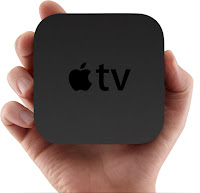
But I do now.

And I like it.

Actually, I think I like it better than the Apple TV, except for one thing. And that's the fact that it lets me play iTunes content on the TV. That's the whole reason I got it for. The rest of the stuff -- the Netflix, YouTube, and movie rentals -- I didn't need, since I could do all that on the TiVo already.

However, the Roku lets me do that too. And for some reason, I like it better.

The difference is that Roku lets me get Amazon content. Sure, the TiVo does Amazon content, too, but it has to download it first. The Roku lets me stream it.

Roku also does Hulu content, too. Well, Hulu Plus content. Don't get me started on why you can't watch Hulu content on Hulu Plus devices. That's another rant.

It has some other content, too. A bunch of channels to which you can subscribe. Some are pretty good, some are really lame, and some will try to sell you content you can get from free from others.

Still, I like the Roku.

One other nice feature about the Roku is that you have more choices about connecting it to a TV. Apple TV only connects via HDMI. Roku connects via HDMI, as well as (for the $99 model) component or composite video and analog or optical audio.

If I had to choose between Roku and Apple TV, I don't know which I'd choose. Probably Roku. But I don't have to choose. I like them both. And I got them both. They're awesome.

Wednesday, December 22, 2010

How to set up Apple TV sharing for computers with different iTunes accounts

Here's the scenario:
  • You have iTunes and you buy your stuff under your own iTunes account.
  • Someone else in the house (or on the same network) has iTunes and buys stuff under their own iTunes account.
  • You have an Apple TV and want to be able to play anything from either iTunes account on the TV/sound system.
How common is this scenario? I don't know. It applies to Wife and me. But, it's not common enough for you to be able to find out how to do this easily from Apple.

All the instructions from Apple assume that everyone is using the same iTunes account. Wife and I have separate accounts and prefer it that way. For others, it could be a roommate situation. Or it could be another family situations where the teenager has his own account that's fed with prepay iTunes cards, and the parents have iTunes with their credit card; and you don't want to give your teenager unlimited access to your credit card.

Whatever the reason, there are plenty of good reasons for computers on the network to want to connect to Apple TV but still run different iTunes accounts.

Pick the Home Sharing Account

First thing you need to do is pick which Home Sharing account you want to use. You see, the way the Apple TV can play stuff off your computer is via the Home Sharing feature of iTunes.

The catch is, if you want to allow rentals via the Apple TV, this is the account that will be used, unless you sign out after each purchase. More about that later. This isn't a show-stopper, as you'll see.

For my purposes, I chose my Apple ID. In a college or other roommate situation, you might want to use your Apple ID, since that gives you control over who can access it.

Set Up Home Sharing on the Your Computer

Launch iTunes.


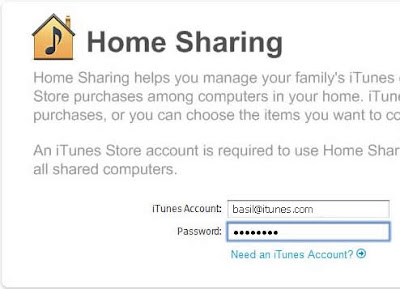
From iTunes, click "Advanced" and select "Turn on Home Sharing"


If prompted, log in to iTunes with your account.

You are now set for Home Sharing.

Set Up Home Sharing on the Other Computers

In order to share content on the various computers, they'll have to use the same Home Sharing account. This doesn't mean they'll be able to access your iTunes account, but it does mean they can share your content across the network.

Go to the other computer and launch iTunes.


From iTunes, click "Advanced" and select "Turn on Home Sharing"


Log in to iTunes with your account.


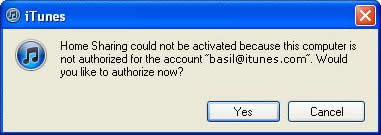
If this computer is not already authorized for your iTunes account, you'll be prompted to authorize it. That's the only way Home Sharing will work.


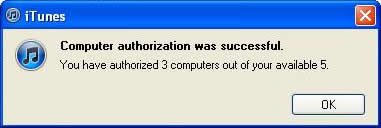
You'll be notified that the computer is now authorized on your account, and how many authorizations you have left. You'll need one for each computer on the Home Sharing network (including yours) and for Apple TV.

If you don't have enough, go to the other computers that you've already authorized and deauthorize the ones you no longer want authorized. You only have 5 to go around, so you may have to make some hard decisions. If you don't remember what all computers you authorized, you can reset your authorizations. Apple lets you do that once a year. If you do a reset, you'll have to reauthorized your computer.


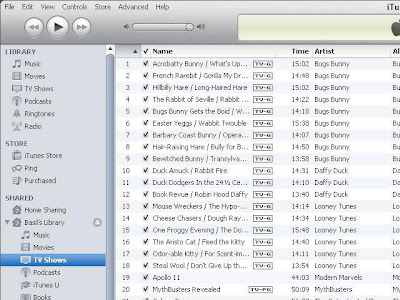
Your iTunes library will now show up on that computer. This user can copy anything in your iTunes library to his library, as long as that computer is on the same Home Sharing account.

Set Up Home Sharing on the Apple TV

Set up your Apple TV. That involves connecting the HDMI cable and the power cord. You can connect the optical audio cable if you use that. You can also connect LAN connection if you like, but Apple TV supports 802.11a/b/g/n, so you can go WiFi.


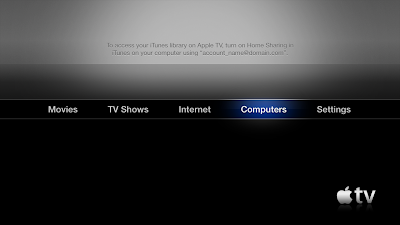
After it's started, select "Computers" then "Turn On Home Sharing."

Enter the same Apple ID and password you entered on your computer, then choose Done.


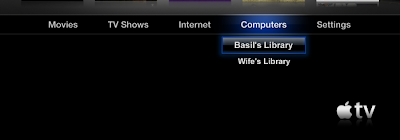
The iTunes library's logged in to the Home Sharing account should appear.


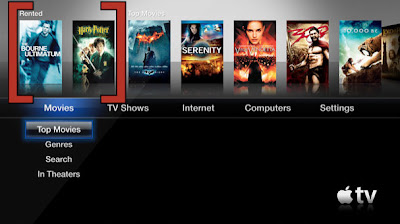
You will also see any rentals made to the Home Sharing iTunes account.

If you have any trouble, recheck the instructions and try again. Or, try Apple's help page.

You should be good to go, though.

It was actually easy to set up. The hard part was figuring out that the other computers can be logged in to one iTunes account but another Home Sharing account. Once you get that part down, the rest is easy.

Tuesday, December 21, 2010

Apple TV

Got an Apple TV box recently.

In case you aren't familiar with Apple TV, it's a little box that you hook up to your TV that allows you to send content to your TV.

Apple is pushing their movie and TV rentals, although that's not what attracted me to the device. I have been buying content from Amazon.com and feeding it to my TiVo device.

They're making a big deal about its Netflix integration, but that's not a selling point for me. I already have that with Tivo.

The playing of iTunes content on the TV is what sold it for me. I've been wanting to be able to do that. And Wife wanted to do that. And, with Apple TV, we can. Wirelessly.

To do that, you have to turn on the Home Sharing feature. Where it was cumbersome is that Wife has one iTunes account and I have another. So, it took a bit to figure out that she can be signed in on her iTunes account but signed in to Home Sharing on my account, and we can share content with each other and with the Apple TV.

Now, the other things -- Netflix, YouTube, movie and TV rentals -- weren't a selling point for me. But, I do like the Netflix interface on Apple TV better than the one on TiVo. On my TiVo HD (I don't have the new Premiere, so I don't know how well it works) the only thing I can do with Netflix is play what's in my Streaming Queue. And I have to manage it on my computer. But, on the Apple TV, I can manage it from the menu. Not as easy as I can on the computer, but at least I don't have to go to the computer to manage it unless I want to; with Tivo, I have to.

TV rentals may come into play later. I'm looking at the cost of taking all my content from the Internet and dropping cable and TiVo. If I did that today, I'd save $171.04 a year, but I'd lose some programs: six network shows, local programming, and all live sports.

Let me add that I'm talking about watching on the TV, not through a browser. I'm talking about a full TV experience: content on the big screen where everyone in the living room can see it. So, watching online (Hulu standard, ESPN, etc.) isn't a viable solution.

Still, talking about Apple TV, I can sum it up in one word: I like it. Okay, that's three words. But that's how much I like it.

The content is clear, much clearer than through the TiVo for similar content. Probably because it connectes via HDMI connection, and not the component connection as the TiVo does. In fact, the only way Apple TV connects is via HDMI. And, setup is rather easy. The only issue was, as I mentioned, when you try to Home Share with multiple computers on multiple iTunes accounts.

It's worth the $99 it cost.

What about and alternative device? Like the Roku?

I can't say. I don't have one.

Yet.

Wednesday, February 17, 2010

I have now joined the 21st century

I have finally started using a feed reader.

Yes, I know. I'm several years behind the rest of teh Internets when it comes to using an RSS reader for blogs I follow. But, I've finally decided to give it a shot. And I like it.

Now, I have tried feed readers in the past. My thoughts were: meh.

Perhaps it was just me. Perhaps I had a really sucky reader (no, I actually don't remember which one it was, but I didn't care for it). So, I did things the old fashioned way: I clicked links and went to the blogs I followed, and read.

After a while, that really becomes a chore. Sure, I could only follow a few blogs. In fact, that's what I ended up doing. Despite have a large blogroll, I found I would click on only a few blogs. I had to force myself to check them all.

And, if I have to force myself to do something, I'm not going to enjoy it. So, I eventually started just clicking on a few regular blogs. And, as a result, I missed out on some good stuff.

But, a few weeks ago, I decided to do some maintenance on my little blog, and that maintenance included updating my feed configuration -- something I hadn't put any serious effort into for some time.

Part of my standard methodology of making Web changes -- and changing the feed (I use FeedBurner) is a Web change -- is to see how the changes look in a browser. There's nothing worse than screwing up your Website and not knowing!

To view the changes in an RSS feed, I thought it would be a good idea to view it in a reader. And, since this little blog is hosted on Google's Blogger platform (they bought it a while back), and since FeedBurner is also a Google product (they bought it a while back), I decided to use Google Reader to check out the feed.

It was easy enough to set up a feed in Google Reader -- real easy in Firefox, in fact -- I decided to check out other blogs, starting with IMAO (not just because Frank J lets me blog there sometimes, but because I've been a fan for many years).

"Cool," I thought. And I added a few more. And a few more. Then, I discovered that there was an easy way to set up blogs from my blogroll (which is a simply list of blogs I added through Google/Blogger's Follow process).

"Cool," I thought. And then I discovered why many people use RSS readers. And, I'm not missing nearly as much as I used to. Everything's right there.

Some blogs use summary feeds. That means the feed contains just a teaser, and the reader must click to the blog to Read The Whole Thing. If the teaser teases me properly, I'll click through. But I don't prefer that method of feeds.

Many blogs put their entire posts there. When that happens, I can read from the Google Reader window. That's the way I prefer. And that's how I do my feed. Anyway, I'm enjoying using my feed reader.

I have now joined the early 2000s.

I've also been looking at video games. Have you seen this thing called Pong?

Tuesday, August 14, 2007

WiFi woes

So far, I'm liking my new Macbook.

There are some things that are different. But some things are the same.

My browser, for instance. I quit using Internet Explorer when Firefox came out. And I use Firefox on the Macbook instead of Safari, Apple's own browser. So the browser's pretty much the same. Minor differences, sure, but only minor.

My old Gateway laptop had WiFi connectivity. After I added a card. Old computer, after all. The Dell notebook had it built-in, which was really handy.

The Macbook has built-in WiFi, of course. And, it's really easy to connect to hotspots around town.

For example, the Wife and I often eat at the Subway on Broadway in Columbus. It's not that far from where she works or where I work. And the first time I used the Macbook there, the network connection thingy popped right up, asking me if I wanted to connect to "Subway On Broad."

I did.

And that's actually a couple of mouse-clicks easier than it is to do on the Dell. The Windows machine. So, yeah, it's easier.

Well, that was last Friday.

Monday, I decided to take the Macbook out to lunch. And we went to McDonald's. The one on Veteran's, near 14th Street. It's not too far from where we work. And we had a couple of Arch Cards we hadn't used. And they got WiFi.

Or so they say. It didn't work for me.

The folks there ... or the ones that were there Monday ... didn't know a whole lot about it.

The little girl who was cleaning up tables pointed me right to one of the ladies behind the counter. The lady behind the counter offered one suggestion, but it wasn't applicable.

You see, I was connected to their WiFi. I know so, because, just like it had a couple of days before at Subway, the little connection thingy popped up, asking me if I wanted to connect to "McDonald's."

I did.

And it connected. But wouldn't get on the Internet.

Which told me their network was running, but their network wasn't on the Internet.

I've had that happen at the house on occasion. It usually means that the router isn't routering -- that's a technical term -- properly. It happens every couple of months or so. I suspect because it's a cheap router I bought one night from Wal-Mart. Anyway, when it happens, if I tell the router to restart, it usually fixes it.

Well, that's how McDonald's was acting.

And the lady behind the counter, once she understood that I was on their network, but wasn't on the Internet, told another lady, who was a manager. Or at least, was wearing a blue shirt like the managers at that store do.

After several minutes, this other lady finally told me she didn't know but would ask her manager. She went to some fellow wearing a blue shirt.

After several more minutes, she came back and said they didn't know why it wasn't working for me because it worked a couple of days ago.

I thanked her and walked away, put my computer up, and left.

To me, they ought to either have a working hotspot ... and be able to do simple troubleshooting when it goes out ... or they ought to take the thing out.

I realize that a free hotspot isn't the most important thing about a McDonald's. The most important thing is getting the new toy in the Happy Meal. But, if they aren't going to do something right, they ought not to do it.

And, no, it's not my computer. I'm sitting in the Subway on Broad as I type this.

Yeah, I really do need to get a life.

Sunday, August 12, 2007

Thinking Different

I've loved and hated computers for years. Usually the love of computers wins out. But the hate surfaces from time to time.

First computer I ever dealt with ... hands on ... was at Brunswick Junior College. One of those dial-in terminals with the large black telephone and an acoustic coupler. If you don't know what an acoustic coupler is, you're new to computers.

Anyway, a friend was going to school over at Brunswick, and I'd ride over there on occasion, since I had days off after working nights. He showed me the computer terminal room, which he was enjoying because of the computer classes he was taking.

I fell in love with the computer right away.

Those old terminals, which dialed in to the computers in Athens (UGA), didn't have a screen. Paper output only. Looked like a teletype machine. Sort of like this one.

When I enrolled in school there and took my first computer classes, I thought I was in heaven. I knew I had to get me a computer. Once I had a few million dollars.

Of course, not long after that, computers showed up in stores. And they were years ahead of the old teletype terminals I had used just a couple of years earlier.

I bought a Radio Shack Color Computer 2, an Adam, a TRS-80 Model 4, and an MC-10. I never had a Commodore 64, though. I saw one and just didn't like it. But, in the small computer geek circle I hung around, I was the first one to venture into the land of MS-DOS. I bought a Tandy 1000, which ran MS-DOS 2.11. Later, I upgraded to DOS 3.2, then DOS 4, but removed that after just a little bit. I upgraded it to DOS 5, then DOS 6.

Along the way, I tried out this little thing called Windows. Version 2.03.

I got into putting together my own computers from parts, and eventually upgraded to Windows 3.0. Later, 3.1, then Windows 95 and Windows 98.

Bought a Gateway desktop with Windows ME, and got rid of that piece of crap operating system almost as soon as Windows XP came out. I later bought a Dell desktop, Gateway laptops, Dell notebooks ... for me, for the Wife, for Number One Son, and for the Little Princess.

The whole time, I was still having a love-hate relationship with computers. At times, I was amazed and thrilled at all the things one could do with a computer.

At the same time, I was quite frustrated with lots of the things I'd run into with computers. Like the Blue Screen Of Death.

Oh, sure, I don't think I've had a BSOD since I dumped Windows ME. But still, there'd be lockups and crashes and such.

And viruses.

I got my first virus back in the days of DOS 4. Stoned. That's when I learned to have an anti-virus program on my computer.

I had McAfee (before they were bought out), Microsoft AntiVirus, IBM AntiVirus, Norton AntiVirus (before they were bought out) ... I tried several. And was happy with most of them.

Well, okay, "happy" is a little strong. I had accepted that I needed security software. And those packages worked rather well.

But it frustrated me that I had to add security software to my operating system. However, that was the reality of having a computer that ran a Microsoft operating system. And that's what I had.

After a while, I decided to try to find a different platform to try. And I tried Linux.

Linux didn't work just right. Well, not with my hardware. I really liked Linux, but there were some issues with the video card in my laptop. And there's not a lot of quality help with issues.

So, I was stuck with a Microsoft operating system.

Vulnerable to all kinds of security threats. Running slow. Frightening upgrades. Software crashes. Hardware crashes. Hard-to-use software. Hardware folks blaming the software folks while the software folks blame the hardware folks.

And on and on.

Linux was supposed to take me away from all that. But it didn't work with my hardware.

So, I was stuck in Windows world.

Until ... this week ... I did the unthinkable.

I bought a Mac.

Wednesday, August 8, 2007

Pod People II

The Wife and I went on a trip this past weekend. We sort of went to Atlanta.

I say "sort of," because that's not where we were planning on going to start with. And not were we ended up. But where we stopped along the way. And not just to grab a bite. But we did some shopping. Or looking.

You might recall that the Wife got her an iPod. One of those little iPod Shuffle things. She likes it. And so do I.

When we were contemplating purchasing it, we actually said aloud that we'd probably get that one because we didn't want to spend a lot of money. Actually, a lot lot. Because, when you get right down to it, $79 is a lot of money. But the iPod Nano is $149 ... and higher. And the big iPod is $249 ... and higher. So, the Shuffle is a lot of money. But the Nano is a lot lot of money. And the iPod is a lot lot lot of money.

Anyway, we figured we'd spend the money on the iPod Shuffle and then want either a Nano or a big iPod.

We wanted the big iPod.

Okay, she's actually happy. I want the big iPod.

And, this weekend, we were going to South Carolina ... and just happened to be heading through Atlanta.

Yes, there are places in Columbus where you can buy an iPod. But not places where you can ask questions.

But Atlanta has places like that. Called the Apple Store. And there's one in Lenox Mall. So, we jumped off of I-85 (if Apple owned it, it'd be i85) and headed up Lenox Road to the Mall.

Being hungry and all, we ate first. Then worked our way up the elevators and escalators to the top level, where the Apple Store was located.

And got in line.

You might want to read that again.

We got in line.

There was a line to get into the Apple Store.

People were queued up to talk to 20-somethings who had either too much facial hair or too many bits of metal in their heads.

Okay, not all of the folks working there looked like that. But the PC Guy in me has to think that way.

[kml_flashembed movie="http://youtube.com/v/FdA51hlTKrM" width="425" height="350" wmode="transparent" /]

So, we stood in line and were eventually seen by a young man ... "Kevin" according to his name tag ... who had facial hair, but in the "I grew a beard" style, not the "I'm too lazy to shave" style.

Kevin was actually quite courteous and helpful. He didn't seem to mind answering questions for a couple of folks who talked like they were from around there.

But I noticed some stuff about the folks there. Not the Apple folks, but the customers.

They stood in line to get into a store that sold expensive stuff. The line had as many people in it as there were people in the store shopping.

They stood in line to pay for expensive stuff. There seemed to be as many people in line to pay for stuff as there were people standing in line to get in ... or in between, shopping.

Oh, and it wasn't just a couple of Mac geeks or iPod salesmen in t-shirts keeping people in line. Mall cops were there with badges and uniforms and everything.

But the folks there were very helpful about the different questions we asked, whether about the iPod or the Mac computers.

How helpful?

There's an iPod in my pocket as I type this. The 80 GB. That holds 20,000 songs.

Yes, I'm a Pod Person, too.

Monday, August 6, 2007

Linux we hardly knew ye

I gave it a shot.

I tried. I really did.

But Linux isn't for me. Or, at least, not for my computers.

Oh, I really, really want to give it a shot. It's just more work than I'm wanting to put into it right now.

Here's the deal. I've been interested in running Linux on a computer for some time. Linux has lots of things I like.

For one thing, it's secure. Or, at least, much more secure than Microsoft Windows.

And it reminds me of the "old days" with computers. Before Windows.

You see, I've had a computer in one form or another for ... gosh ... 25 years. Actually, longer than that.

I had a Tandy Color Computer 2 (the "CoCo 2"), an Adam (remember those?), a TRS-80 Model 4, an MC-10 ... before joining the PC universe with a Tandy 1000.

The Tandy 1000 ran MS-DOS 2.11 ... and actually still ran the last time I booted it up, just a few years ago. I eventually added Windows 2.03 to it. Of course, it was running DOS 3.2 by then. Later DOS 5 and DOS 6 ... and, of course, Windows 3.0 then 3.1.

I had gone beyond the Tandy 1000 to a "put together" PC. I used Windows 95, then Windows 98. When I bought my first Gateway, it came with Windows ME (which sucked then, and still sucks today). I upgraded to Windows XP almost as soon as it came out.

Eventually, I broke down and bought a laptop (Gateway) ... and eventually replaced it with a newer laptop (Dell). They still run Windows XP Professional.

Only, the whole time, I wondered if there was something else. Something ... well, if not better, more exciting and fun.

And I've been tinkering with Linux for a bit.

I bought SuSE Linux (now Novell Linux) back when version 9.0 came out. I tried it on a couple of computers. A Compaq server I bought 2nd-hand, as well as the Gateway (which had retired from service).

Frustrated with issues with performance ... related to hardware, I thought ... I decided to use Windows 2003 for a server instead, and did for a bit.

I stopped hosting myself, and took the servers down, wanting to find something for a side project.

That's when fellow blogger Joe pointed me to Ubuntu Linux.

I really liked Ubuntu ... except for one thing.

It works very well. Very fast. Very friendly. It surprised me just how well it worked.

Except for one thing.

The Gateway M305X video card won't work with Ubuntu Linux to give a resolution higher than 800 x 600. And I want 1024 x 768. And I won't budge off of this. Anyway, some of the screens don't fit 800 x 600 very well.

So, with much misgivings, I took Ubuntu off and put Windows XP on.

I'm not saying I'm done with Ubuntu. I am saying that it's done as far as that computer is concerned.

Which means, for me anyway, I won't be using Ubuntu for my personal PC. I'm still looking at setting it up as a server. But not for my personal PC.

For that, I must stay in the Windows XP world.

For now.

But that might change.

Very soon.

Very, very soon.

More about that ... and a trip we took ... later.

Thursday, July 26, 2007

Pod people

Normally, I'm the one to go for the little gadgets and such. Like the PDA. I bought a PDA a little while back. The Wife was not impressed. True, she uses it more than I do, but only to play Bubble Breaker or Sudoku or some such.

The TiVo was my idea, too. It records her two soaps every day. And a bunch of John Wayne westerns for her, too. But she again thought it was a bad idea. Even though she wanted to make sure that when the year-long contract was up, we kept the service. And we have.

A laptop computer was my idea. She was a little bit warmer to that idea than most, but still, there was some hesitancy about it.

Well, I think things have changed.

Guess who has an iPod?

No, not me.

The Wife does.

True, it's the little iPod Shuffle. The real small, brushed aluminum one that can clip on to a sleeve ... or, ahem, a strap ... and be out of sight.

Yes, she has a pretty pink iPod Shuffle. And so far, she's only put 214 songs on it. No, that's not a made-up number. That's the number of songs on her playlist that she Autofills from. iPod people will know what I'm talking about.

I'm starting to feel a little like Kevin McCarthy.

Because I want one now.

Tuesday, June 12, 2007

Computin In West Virginia

Photo Sharing and Video Hosting at PhotobucketBeing from the South, I understand the frustration when folks make fun of you, your area, or your state.

But, doggone it, sometimes some people make it so darn easy.

Take WVNet, for instance. Sure, West Virginia isn't a Southern state, but they get made fun of as much as ... or more than ... Alabama, Mississippi, Arkansas, Georgia, and the rest.

But, like I said, sometimes some people make it so darn easy.

According to their site:
WVNET is the West Virginia Network, a dynamic service organization providing telecommunications and computing services within West Virginia. WVNET was created in 1975 to provide central computing facilities and wide-area network communications linking its "central site" computing resources in Morgantown with the campus computing systems at most of the colleges and universities throughout the state.

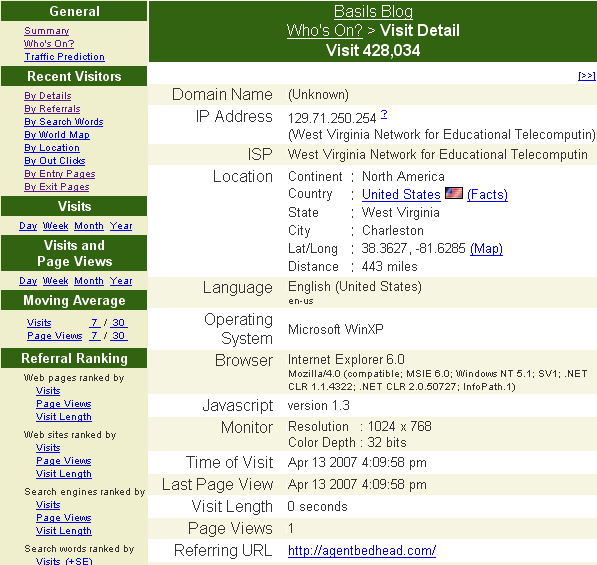
That's all well and good. But check out this image I captured from the visitor logs about a visitor from WVNet. Notice how they spell "West Virginia Network for Educational Telecomputing." Note the last word is spelled in the logs as "Telecomputin" and not "Telecomputing."

Now, in fairness to West Virginia and WVNet, they spell it right the whole time. On the bill that created WVNet (PDF), on the WHOIS search, and everywhere else I can find.

But it seems that the fates are determined to make fun of West Virginia. The Site Meter logs truncate the last letter. And that is what turns "Telecomputing" into "Telecomputin."

Sometimes you just can't win.

Monday, June 4, 2007

How To Be A Lesbian

No, I'm not about to offer tips on how to become a lesbian.

I don't think such things are possible. Although, not being a lesbian, I can't speak from personal experience.

But you may be wondering why anyone would write something called "How to be a lesbian."

Me too.

You see, I ran across that while going through a spam filter.

In case you aren't aware, blogs that accepts comments and/or trackbacks get spam.

That is, there are some folks that attempt to leave comments or links to Web pages for ... well, for all kind of purposes.

These comments or trackbacks don't have anything to do with the post. They are rude interruptions that are usually attempting to sucker people into buying stuff. Sometimes indirectly, sometimes directly.

Sometimes, these Websites are malicious. That is, they try to crack your computer via your Web browser.

And, there are probably other reasons that people leave spam.

But what amazed me was that I found one with the heading "How to be a lesbian."

Just who is this kind of thing targeting?

Horny teens (you know who you are) or just plain perverts (you know who you are, too)?

Or people that say "WTF?"

Or are spammers having a contest that we don't know about? Like, which spammer can come up with the most ridiculous topic for a spam session?

I just don't understand.

But then, the Wife doesn't understand why I like to watch Whacked Out Sports.

Tuesday, May 29, 2007

How Not To Bulk Email

I'll be following up later with a post about the cat-fight going on between the cable company that services my area and the local ABC affiliate.

But, in my inquiries of trying to obtain more information about it, the GM of the local channel (WTVM) committed a horrible error in judgement in the way he responded.

You see, he sent an email to 417 addresses.

That's not what's so bad. What's so bad is how he did it.

He put all 417 address in the "to" field of the email!

Now, you might be asking yourself why that's a bad thing.

Well, let me tell you why.

Let's suppose for a second that someone has a vulnerable computer. Let's call him Doofus.

Now, let's suppose that Doofus and 416 other people contact a businessman -- let's call him Lee -- about something.

Now, let's suppose that one of those other 416 people is ... you. We'll call that person You.

Lee gets a bunch of emails. From You. From Doofus. And from 415 others. And he decides to respond to them all with a single email. This is reasonable, since he's being bombarded with a bunch of emails all talking about the same thing.

So, anyway, Lee composes an email to send to everyone that emailed him.

And he includes all 417 email addresses -- including Doofus and You -- in the "to" field for the email.

Now, here's what happens. You, Doofus, and 415 others get an email. And all 417 of you can see the email addresses of the others. That in and of itself is bad form.

But it gets worse.

Remember that Doofus has a vulnerable computer. He either doesn't have good security software running on his computer. Or it's out of date. Or something. The bottom line is, Doofus' computer is vulnerable.

So vulnerable that he's got a computer that's infected with something nasty.

And that something nasty is a program that harvests email addresses.

That is to say, it's checking Doofus' incoming emails and harvesting addresses.

And because of Doofus, everyone else on that email is now part of the list of the harvesting program. And everyone is going to start getting a s**tload of spam.

Now, what should Lee have done?

He should have included the addresses in the "bcc" field.

That way, when the harvesting program that's running on Doofus' computer tries to harvest emails, it's not going to get anything new.

You see, it already had Doofus' email address. That's how Doofus got the malware to begin with.

It already had Lee's email address because it got it when Doofus emailed Lee to start with.

But it didn't get the other 416 email addresses.

So, bloggers, if you ever have the need or strong desire to send emails to a lot of people, be sure to use the "bcc" field and not the "to" field.

Using the "to" field can cause grief to the whole list if just one of the people to whom it's sent has harvesting malware.

Using the "bcc" field will at least show care and concern over those on your list. It's being a good email neighbor.

And it keeps you from becoming a Doofus, too.

Monday, March 5, 2007

WordPress Hacked

The thing I had feared the most finally happened.

Okay, not the thing I feared the most, but one thing I was concerned would happen: WordPress was hacked.

Some time during the last week of February, someone hacked the most current version of WordPress (2.1.1). WordPress has the details:
It was determined that a cracker had gained user-level access to one of the servers that powers wordpress.org, and had used that access to modify the download file. We have locked down that server for further forensics, but at this time it appears that the 2.1.1 download was the only thing touched by the attack. They modified two files in WP to include code that would allow for remote PHP execution.

Which means that blogs using the latest version of WordPress were vulnerable.

Including this little blog.

So, when I found out about the WordPress vulnerability, I had to update.

And with the issues I've had with my computer recently, it's not been easy to update.

You see, with Network Solutions hosting, I have to upload WordPress to the site and manually perform the update. With Dreamhost -- where this little blog used to reside -- it was really easy to update: just click a link and it was done.

Updating is a pain, to be sure. But it needed to be done.

And all because someone hacked WordPress' servers.

I'm not about to call for the death penalty for hackers. But beating with a large stick sounds in order.